Keeping your SFTP system secure: best practices for system admins
13th July 2026
File transfer is a cornerstone of modern business. But cybersecurity threats are continually in flux, with attackers exploiting misconfigured systems, weak access controls and outdated protocols. File transfer can be one potential point of vulnerability if the appropriate steps are not taken.

For a lot of organisations, Secure File Transfer Protocol (SFTP) is the preferred standard for transferring sensitive data, offering encryption and a more robust framework than older methods like FTP if encryption if not used. However, like any IT system, SFTP’s effectiveness ultimately depends on how well it’s configured and managed.
System administrators have a central role to play in ensuring that SFTP environments remain shielded against attack. A single oversight – whether it’s a dormant account left active or a misconfigured firewall – can lead to unauthorised access, data breaches and the regulatory and reputational consequences that go with them.
This guide sets out the best practices for system admins in securing SFTP environments, starting with an overview of today’s cybersecurity threats and then outlining practical steps to harden systems against intruders. We will also look at a variety of other strategies to ensure that SFTP systems remain robust, resilient and compliant.
Understanding the threat landscape
Before delving into the technical controls, it is essential to discuss the risks that IT systems, including SFTP servers currently face. Cybersecurity, after all, is not static but dynamic; attackers continually refine their methods to exploit weaknesses. For system administrators, an understanding of the threat landscape is a crucial prerequisite to implementing effective defences.
Common threats fall into four main categories: Unauthorised Access, Misconfiguration, Data Breaches, and Insider Threats.
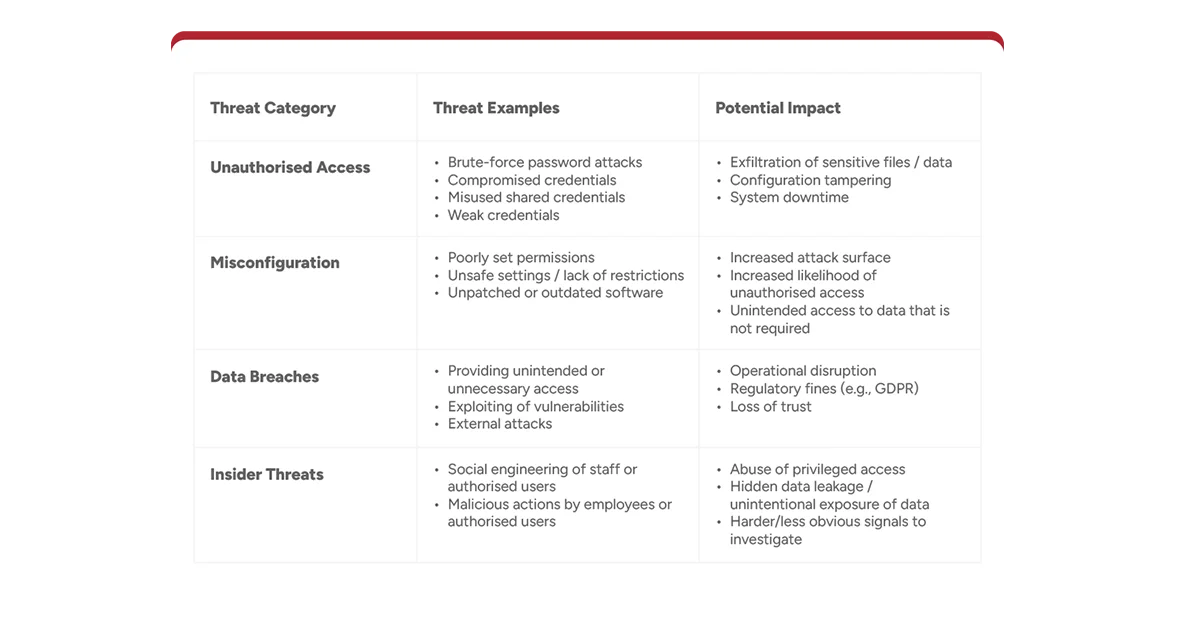
Much of the conversation around cybersecurity focuses on external attackers, but insider risks – from disgruntled employees or careless contractors, for example – can be equally damaging.
System admins must strike a balance between making SFTP systems available to those who most need them while preventing abuse or accidental exposure of sensitive data.
Understanding the risks can enable admins to approach SFTP security in a layered manner, recognising that each and every measure, however small it might appear in isolation, makes an important contribution to the overall security of the system.
Locking down external access
The first line of defence for any SFTP system is controlling access to it. Exposing a server to the entire internet without restrictions can invite unnecessary risk. Administrators should instead apply strict access controls that limit access only to those who genuinely need it.
Firewalls are central to this. By default, only the necessary ports for SFTP should be open, and even then access can further be restricted to known and trusted IP addresses. Whitelisting ensures that only authorised networks can initiate connections, significantly reducing the potential attack surface. For organisations with distributed teams or third-party partners, administrators can configure multiple whitelisted ranges, allowing legitimate access while barring the way to intruders.
Typical deployment scenarios might involve allowing only the company’s office locations and approved vendor IPs to connect. Remote employees can be accommodated through VPN tunnels so that even when working outside of trusted networks, their connection to the SFTP server remains secure and verifiable.
Locking down external access to SFTP systems is not a silver bullet, it must be added. Nevertheless, it significantly reduces exposure and makes sure that attackers cannot simply scan for and probe your systems at will.
Enforcing the principle of least access
One of the most common security missteps is granting users more access than they actually require. Although it might seem convenient to provide broad permissions, doing so dramatically increases the risk of misuse, whether accidental or intentional. The principle of least privilege, ensuring that users have only the minimum access needed to perform their role, is vital to SFTP security.
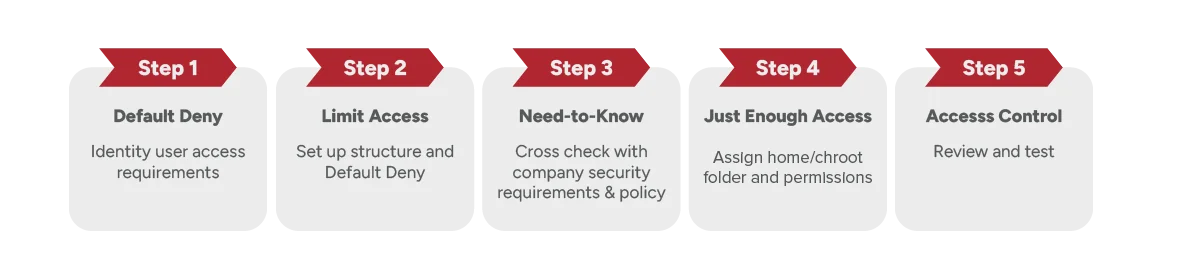
For user configurations, this means carefully considering what files and functions each account requires. A finance user, for example, might need only access to monthly reporting folders, while a third-party vendor might need a specific drop-off location for uploads. By restricting access to precisely what is needed, you can reduce the likelihood of data being exposed unnecessarily.
With some providers it is also possible to restrict users only to the protocols they require. If a user only needs SFTP, there is no reason to allow them to connect via other methods such as FTPS and HTTPS. Limiting protocol access both reduces potential vulnerabilities and simplifies monitoring.
Per-user access controls are a practical way of enforcing least privilege. Each account can be configured with its own permissions, providing granular control over who can see, read, write or delete specific files and directories. This prevents scenarios where one user can inadvertently, or deliberately, access another’s data.
By taking a disciplined approach to access provisioning, system administrators can strike the right balance between functionality and security.
Isolating users with chroot
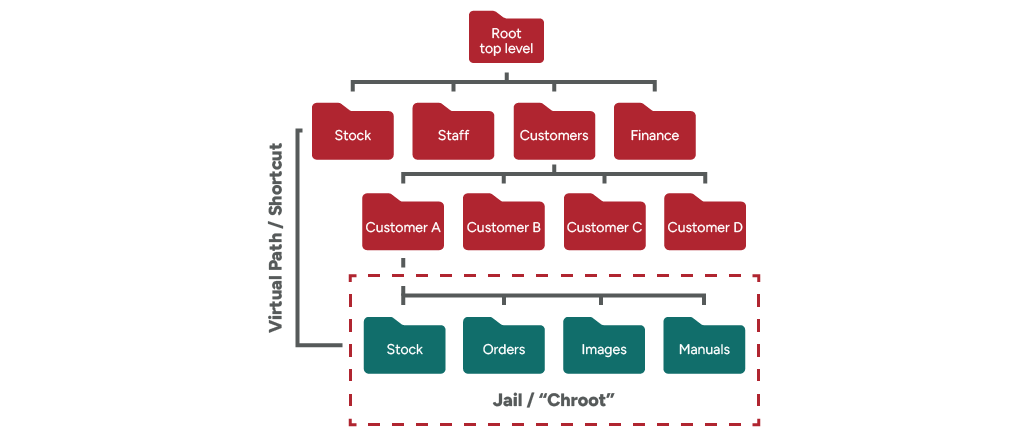
Chroot, sometimes described as “jailing”, is a powerful way to isolate users within their own environment or “home directory / folder”. By changing the apparent root or “top level” directory of a process, administrators can confine users to their own designated folders so that they are unable to navigate into other areas of the file system, or even have visibility of them.
This prevents crossover access risks, where a misconfigured account might otherwise gain visibility into sensitive directories belonging to other users or the system itself. Chroot ensures that even if a user has more permissions than intended, they remain restricted within their “jail”.
For scenarios where access to multiple directories is required, administrators can use virtual paths or symbolic links. These allow users to access specific folders outside their home directory without exposing the broader file system structure. This balances the need for flexibility with the imperative of isolation so that users can reach what they need without creating any further risks.
Implementing strong authentication
Authentication frequently turns out to be the weakest link in a security chain. Depending on the configuration of the server and protections in place, Passwords, can be vulnerable to brute force attacks, phishing and credential reuse. To truly safeguard SFTP environments, therefore, administrators should go beyond reliance on passwords alone and implement stronger methods of authentication.
For interactive/web-based or management access to SFTP servers, multi-factor authentication, or MFA, is one of the most effective methods. By requiring a second (or more) factor in addition to a password, such as a hardware device or time-based token, MFA makes it far more difficult for attackers to compromise accounts.
For automated processes accessing an SFTP server, key-based authentication is another option. Instead of relying on passwords, public/private key pairs can be used to verify users. Keys are significantly harder to brute force.. Best practices include using sufficiently long keys and passphrase protection where practical. Some providers will also allow you to enforce username, key and password all together.
It is important to exercise caution to exchange keys used for authentication. When administrators are setting up a user for key-based authentication, only the public key is required on the server side.
Setting up SSH key authentication requires some initial effort but pays off in terms of long-term security. Administrators should ensure that keys are properly distributed, stored securely and revoked immediately once they are no longer required.
Automatically detecting suspicious activity
Even the most robust preventative measures cannot guarantee absolute, impenetrable security to threats such as social engineering or compromised staff. This is why monitoring and detection are essential components of any secure SFTP deployment. Administrators must assume that attackers will attempt to access the system and put mechanisms in place to detect and block such malicious behaviour.
Brute force attacks are a common tactic, with attackers systematically guessing passwords as part of an attempt to break in. Tools such as Fail2ban can detect repeated login attempts and automatically block offending IP addresses. Ridgeon Network’s own solutions take this a step further, providing integrated intrusion detection that monitors for suspicious activity in real time and applies countermeasures without the need for any complex configuration for manual interventions.
Limiting login attempts is another simple but effective safeguard. By restricting the number of failed attempts per account and triggering alerts when these thresholds are reached, admins can spot potential compromise attempts sooner. Custom anomaly detection solutions can also flag unusual behaviour, such as logins from unexpected locations or access attempts outside normal business hours.
Monitoring, reporting and auditing
Visibility is the sine qua non of security. Without comprehensive monitoring and reporting, it is impossible to ensure that the relevant policies are being followed, determine when attacks are being attempted or verify that compliance obligations are being adhered to.
Logging every access event is a fundamental necessity. This includes not only successful logins but also failed attempts, file transfers and administrative changes. These logs form the foundation of audit trails, which are critical for demonstrating compliance during regulatory reviews or investigations – they are also useful for debugging data exchange between your users.
Beyond basic logging, administrators should implement full reporting solutions. These provide insights into usage patterns, highlight anomalies and flag any suspicious behaviour for further investigation. Many providers offer only basic logging, leaving administrators to piece reports together manually from logs. By contrast, Ridgeon Network goes further by providing comprehensive web-based reporting and auditing capabilities so that compliance requirements are met without imposing extra burdens on admins.
Removing unused accounts
Dormant accounts are an often overlooked security risk. An old vendor account that was never deactivated, or an employee account left behind after departure, can provide attackers with a ready-made entry point. Because these accounts are left unused and rarely monitored, can be frequently exploited without being detected.
To mitigate this risk, admins should establish formal account review processes. Regularly auditing active accounts against current user lists ensures that only authorised individuals retain access. Any accounts that are no longer needed should be disabled or deleted immediately.
Account lifecycle management should be integrated into HR and vendor management processes. When an employee leaves the organisation or a vendor relationship ends, their SFTP access should be revoked as part of the offboarding checklist. This reduces the likelihood of forgotten accounts being exploited in the future.
Restricting transfers
One of the most fundamental rules of Secure FTP security is to disable plain FTP (without encryption) entirely. Even so, many organisations still leave FTP enabled for legacy reasons, this should be carefully reviewed to check if this is still required.
FTP server administrators should enforce the exclusive use of secure protocols such as SFTP, FTPS and HTTPS to ensure data is encrypted in transit. It is also essential to verify that encryption is enforced on all endpoints and interfaces. Misconfigured clients or overlooked connections can expose sensitive information.
By restricting transfers to encrypted methods only, administrators can make sure that sensitive data is protected both within the organisation and also as it is transmitted over the internet.
Encrypting files at rest
While encryption in transit protects data as it moves, encryption at rest ensures that stored files remain secure even from physical device theft.
The risks of leaving data unencrypted are significant. Financial loss, reputational damage and regulatory penalties can all follow when sensitive information is left exposed. Encryption provides a crucial layer of defence, rendering stolen files unreadable without the appropriate keys.
Most modern storage systems include native encryption features that can be enabled.. Administrators should also ensure that backup data and archive files are encrypted, as these are often overlooked yet contain the same sensitive information as the original source.
For additional layers of protection, users of SFTP hosting can encrypt their files before they are even uploaded from the source using tools such as PGP file encryption. This provides further protection as even if a user was misconfigured with unintended access, the data available would still be unusable unless they held the keys to decrypt it.
Conclusion
Securing an SFTP system requires more than simply enabling encryption or relying on default configurations. It involves a layered, proactive approach addressing threats at every level, from restricting external access and enforcing least privilege to implementing strong authentication, monitoring activity and upholding compliance.
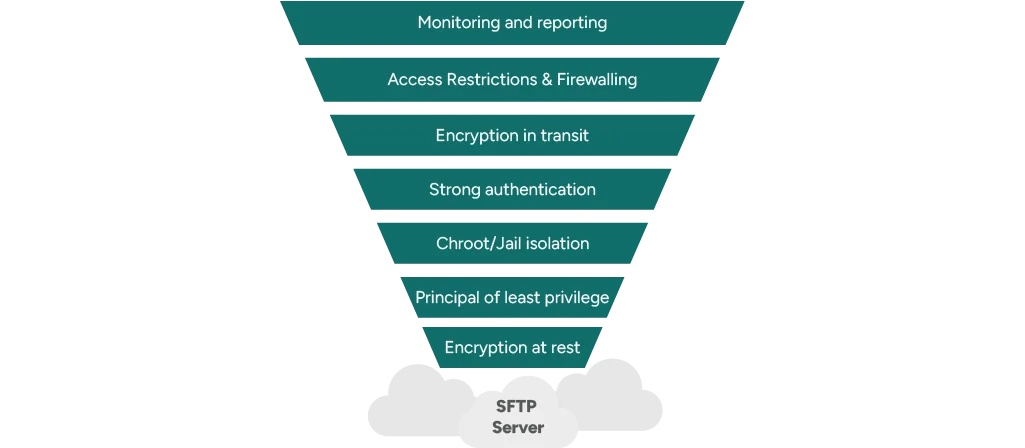
Administrators are the guardians of these environments, responsible as they are both for preventing unauthorised access and keeping data handling practices aligned with regulatory requirements and organisational policies. The measures outlined in this guide provide a foundation for a more resilient system with a robust security posture.
Ridgeon Network’s secure SFTP hosting incorporates security features and builds on these best practices, combining strong encryption, advanced intrusion detection and comprehensive reporting and auditing for a solution that’s secure and practical for your business.
For more than two decades, Ridgeon Network has delivered professional, trusted and secure internet solutions, including secure SFTP hosting. Get in touch with our team of experts to find out more about what we can do for your organisation.